






To show how simple using PowerGroups™ really is, we'll demonstrate how to perform two of the many options available: Confirm A Meeting and Create A Document.


A. Select The Meeting

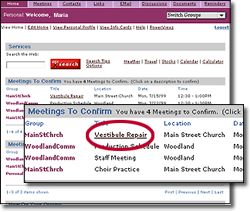
When you're invited to a meeting, it appears in the Confirm You'll Attend A Meeting listing on your Personal Home page (additionally, you'll receive an EMail notifying you, as well). To confirm you'll attend, simply click on the meeting’s name.

B. Indicate Your Attendence Status

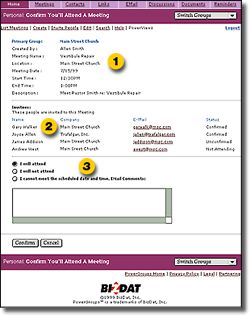
A simple form, aptly titled Confirm You'll Attend A Meeting, opens. The form shows you:

1 Meeting information
Location, time, date, etc.

2 Attendence Status
Who else is invited and their status

3 Attendence Options
Attend, not attend, reschedule


To confirm you'll attend, simply highlight I will attend and click the Confirm button.The creator of the Meeting is notified via EMail that you'll be attending, and the attendence list for the Meeting is updated, changing your attendence status to reflect your choice.

It doesn't get much easier than that.


  Two Things | Confirm A Meeting | Create A Document | Conclusion

  Home | Overview | Features | Demo | FAQ | Site Map | Privacy | Terms
 
BizDat
©1999 BizDat, Inc.
PowerGroups™ is a trademarks of BizDat, Inc.