










Whether you're working in your Personal or Group Spaces (see Demo), the PowerGroups™ Toolbar is always available.
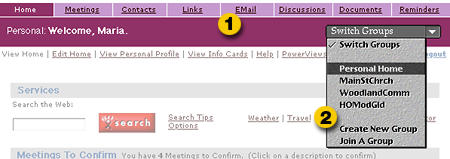
The features available from the Tool Tabs (1) all work the same way, using the same interface. The Group Navigator (2) drop down menu, is also available on every page in PowerGroups, so you can switch between your Personal and Group spaces in seconds.
With PowerGroups, when you've learned one Tool Tab, you've learned them all:
Meetings
List, Create, Edit and Search Meetings; Invite, Uninvite, Manage
People Attending; EMail Notification and Replies; Allows Repeating
Meetings by Day, Week, Month; Meeting Status Displays on Personal
and Group Home Pages
Contacts
List, Create, Edit and Search Contacts; Multiple Info Card Templates
per Contact
Links
List, Create, Edit and Launch Links; Add Links to Personal and
Group Home Pages
EMail
Simple, Forms-Based Outgoing Mailer
Discussions
List, Create and Search Discussion Topics; Enclosures Within Replies;
EMail Notification When Topic Receives Reply; Full-Featured, Structured
Discussion Board
Documents
List, Create, Edit and Search Documents; Template-Based Publishing
of Text and Graphics; Documents Automatically Linked as Web Pages
Within User-Defined Categories
Reminders
List, Create, Edit and Search Reminders; Allows Repeating Events
by Day, Week, Month; Email Notification of Reminders
Personal Space Special Features (available from your Personal Space only)
- PowerViews
- Share
any PowerGroups Contact, Link, Discussion, Document or Reminder
you create with one, all, or any combination of your Groups
- One-click Unsubscribe to remove shared Documents, Discussions and Reminders from your Personal Space
Group Space Special Features (available from your Group Space only)
- One-click
Subscribe to add Group Documents, Discussions or Reminders
to your Personal Space